Koikatsu Texture Resizer

T

Trace7911

Member
Joined
Aug 28, 2024
Messages
7
Reaction score
27
Points
13
Credits
475
Disk space is expensive, and 4k textures are overkill. I wrote a tool to automatically resize large material editor textures. It works with char cards, scenes, and coordinate cards. I thought someone might find it useful, so I’m sharing it. It reduced my PITB folder from 16GB to 9GB, Eve Kaczmarek scenes from 16GB to 10GB, and Grafko clothing from 9GB to 4GB. What the hell, Grafko.

Requires technical knowledge. It’s hosted here: https://gitgoon.dev/Liquid4139/kkPy
Remember to back up your files. It’s worked for me, but I’m not responsible if it corrupts your cards.

Updates:
  • 1.0.0: Added a GUI and a simple run script.
  • 1.0.1: Fixes for texture processing timeouts and processing many files
  • 1.1.1: Fixed scenes outputting as KKS by default, added texture skipping
 
Last edited:
Anni93

Anni93

Veteran Member
Joined
Sep 1, 2024
Messages
178
Reaction score
387
Points
63
Credits
4,485
Disk space is expensive, and 4k textures are overkill. I wrote a tool to automatically resize large material editor textures. It works with char cards, scenes, and coordinate cards. I thought someone might find it useful, so I’m sharing it. It reduced my PITB folder from 16GB to 9GB, Eve Kaczmarek scenes from 16GB to 10GB, and Grafko clothing from 9GB to 4GB. What the hell, Grafko.

Requires technical knowledge. It’s hosted here: https://gitgoon.dev/Liquid4139/kkPy
Remember to back up your files. It’s worked for me, but I’m not responsible if it corrupts your cards.
Holy moly, the automatic resizer. I'll have to test it sometime because it's tedious to do it manually.
Out of curiosity, is there a threshold it adheres to? Does it try to match the lowest possible parameters without losing quality?
Because these assets vary.
For example, one dedicated hair with 4k Maintex can be reduced to 2k because a lower value will lose detail.
|
from what I remember these assets are a good example of this


Statistically, another hair asset can be set to 256-512.(sometime 1k)
The color mask, on the other hand, is from 1-64 pixels.(although there are situations that require 512x512 on such characteristic hair as belial from sentouin or shura from ao no exorcist)
Of which, the detail mask is from 64 to 256.
Clothing is statistically 1k(sometime 2k), while accessories are a bit of a gamble.

Here, paradoxically, we have mods from YueFengYu, for example from Date A Live, which use too large implemented textures from 4k to 8k, which ultimately results in a regression of details, and changing to 2k sharpens the details and quality.


There are also clothing assets based on a few pixels, such as those from SuguP

Head=1k
Body=2k
Eyebrowns 512x512-1024x1024(rarity 1k)
Everything from category eyes 512x512-1024x1024(also rarity 1k)
Tongue 256x256

Alpha mask can sometimes require higher required parameters as opposed to maintex.
(I've encountered this many times when repairing other people's cards, especially on hair accessories.)

Even on clothes the color and detail mask you can set a few pixels if the texture is only a solid color.(sometimes they are implemented in 1-2k and even sometimes some modders unknowingly import in 1k)

There's a lot of flexibility overall, and I'm writing this in short, so I'm curious if there won't be a threshold set, for example, 1k everywhere.(that can be a bad)

Anyway, props for creating this, less experienced people will be able to optimize this mess of textures and reduce the absurd weight of the files.
Especially when a character card uses dozens of accessories that need to be changed, then such manual repair is a good +40 minutes.
 
Last edited:
T

Trace7911

Member
Joined
Aug 28, 2024
Messages
7
Reaction score
27
Points
13
Credits
475
Right now, it's just a dumb resolution filter, anything 4K and larger gets dropped to 2K by default. I figured that probably takes care of the worst offenders. Setting thresholds based on texture type is a good idea though, since that should help people with weaker hardware. I'll get around to adding that later.
 
T

Trace7911

Member
Joined
Aug 28, 2024
Messages
7
Reaction score
27
Points
13
Credits
475
Holy moly, the automatic resizer. I'll have to test it sometime because it's tedious to do it manually.
Out of curiosity, is there a threshold it adheres to? Does it try to match the lowest possible parameters without losing quality?
Because these assets vary.
For example, one dedicated hair with 4k Maintex can be reduced to 2k because a lower value will lose detail.
|
from what I remember these assets are a good example of this


Statistically, another hair asset can be set to 256-512.(sometime 1k)
The color mask, on the other hand, is from 1-64 pixels.
Of which, the detail mask is from 64 to 256.
Clothing is statistically 1k, while accessories are a bit of a gamble.

There are also clothing assets based on a few pixels, such as those from SuguP
There's a lot of flexibility overall, so I'm curious if there won't be a threshold set, for example, 1k everywhere.

Anyway, props for creating this, less experienced people will be able to optimize this mess of textures and reduce the absurd weight of the files.
Especially when a character card uses dozens of accessories that need to be changed, then such manual repair is a good +40 minutes.
I’ve added support for dynamic thresholds based on texture rules. However, I lack familiarity with the material editor to create a good default rule set. I believe it should be flexible enough to cover your requirements. If you get around to playing with it and making a good config, I'll gladly adopt it as the default config.
 
T

Trace7911

Member
Joined
Aug 28, 2024
Messages
7
Reaction score
27
Points
13
Credits
475
There’s now an easy-to-use script to set up and launch the app. It’s also a GUI for easier use. Download the 1.0.0 source from releases, extract it, and run it with `run-gui.bat`.
 
J

Jaacker

Well-known Member
Joined
Apr 21, 2025
Messages
47
Reaction score
104
Points
33
Credits
1,490
There’s now an easy-to-use script to set up and launch the app. It’s also a GUI for easier use. Download the 1.0.0 source from releases, extract it, and run it with `run-gui.bat`.
Thanks man, Im going to test it, but I do have to wonder, how is this thing going to screw up with my cards and stuff? did the stuff you used it for stopped working?
 
J

Jaacker

Well-known Member
Joined
Apr 21, 2025
Messages
47
Reaction score
104
Points
33
Credits
1,490
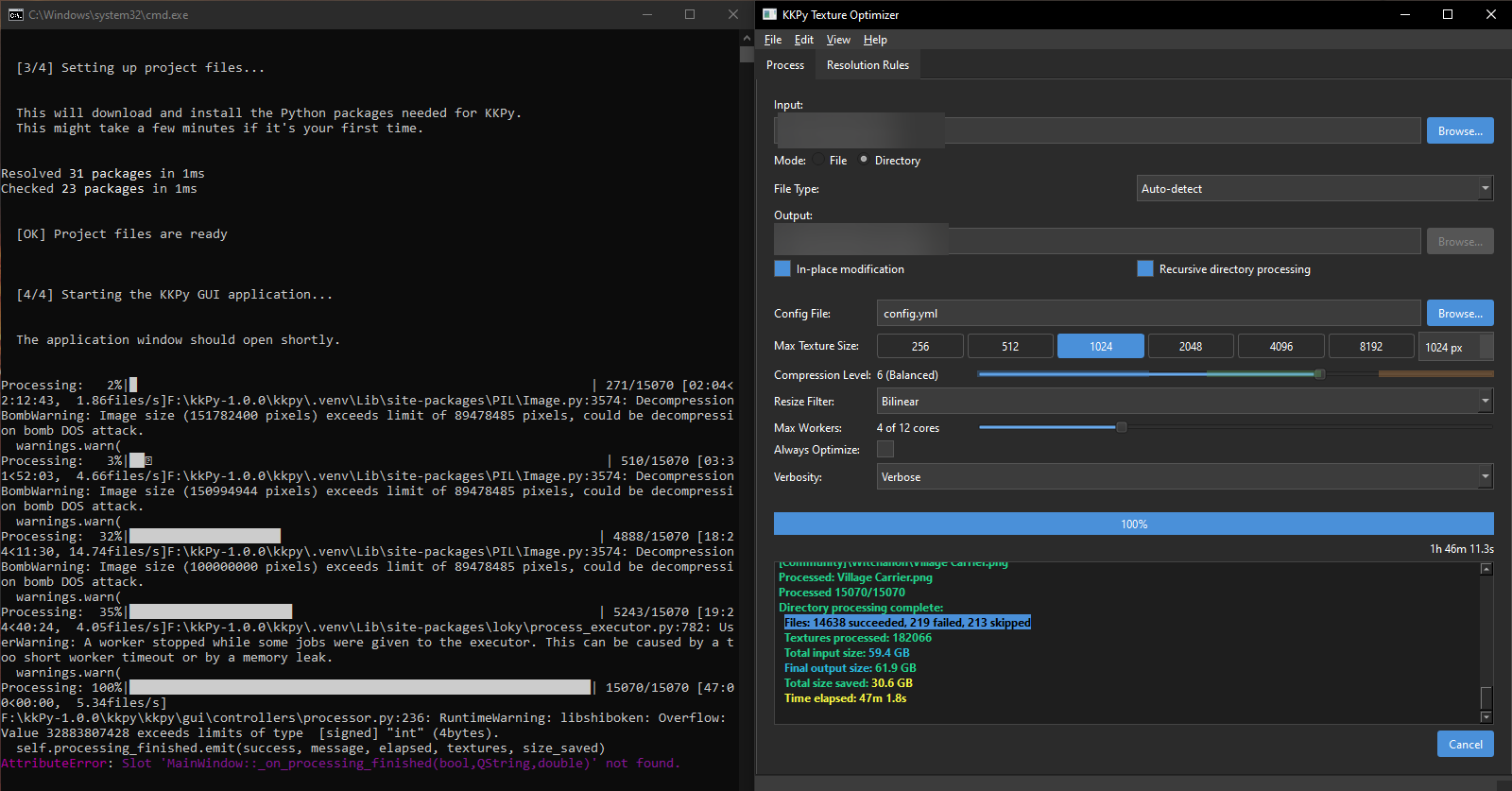
I just made the program go through my whole character card install, I just did a back-up of everything, so I thought it was a good stress test.
For some reason it says that it apparently finished, but it is still processing, I wanted to see the output log of it, but it seems it's not possible, Im sending this images to show how it looks like on my end.
 
J

Jaacker

Well-known Member
Joined
Apr 21, 2025
Messages
47
Reaction score
104
Points
33
Credits
1,490
I just made the program go through my whole character card install, I just did a back-up of everything, so I thought it was a good stress test.
For some reason it says that it apparently finished, but it is still processing, I wanted to see the output log of it, but it seems it's not possible, Im sending this images to show how it looks like on my end.
Also I just checked the box and saw this:
"Files: 14638 succeeded, 219 failed, 213 skipped"
Is there a output log or something in here? I cant find the cards in the small box, and I dont have a search function there.
 
T

Trace7911

Member
Joined
Aug 28, 2024
Messages
7
Reaction score
27
Points
13
Credits
475
Also I just checked the box and saw this:
"Files: 14638 succeeded, 219 failed, 213 skipped"
Is there a output log or something in here? I cant find the cards in the small box, and I dont have a search function there.
That’s a UI bug I need to fix. You have in-place modification enabled, which replaces the original files. Check the originals for any differences. However, you have something that unexpectedly failed, causing it to count time and not complete. This is unexpected given the built-in error handling. I'm going to look into it a little more.
 
J

Jaacker

Well-known Member
Joined
Apr 21, 2025
Messages
47
Reaction score
104
Points
33
Credits
1,490
That’s a UI bug I need to fix. You have in-place modification enabled, which replaces the original files. Check the originals for any differences. However, you have something that unexpectedly failed, causing it to count time and not complete. This is unexpected given the built-in error handling. I'm going to look into it a little more.
I had to close the process directly, it kept going for 1 hour after saying it finished, I even told it to cancel and that did not stopped.
I do think you should maybe make the program generate a output log to let people share issues.
 
J

Jaacker

Well-known Member
Joined
Apr 21, 2025
Messages
47
Reaction score
104
Points
33
Credits
1,490
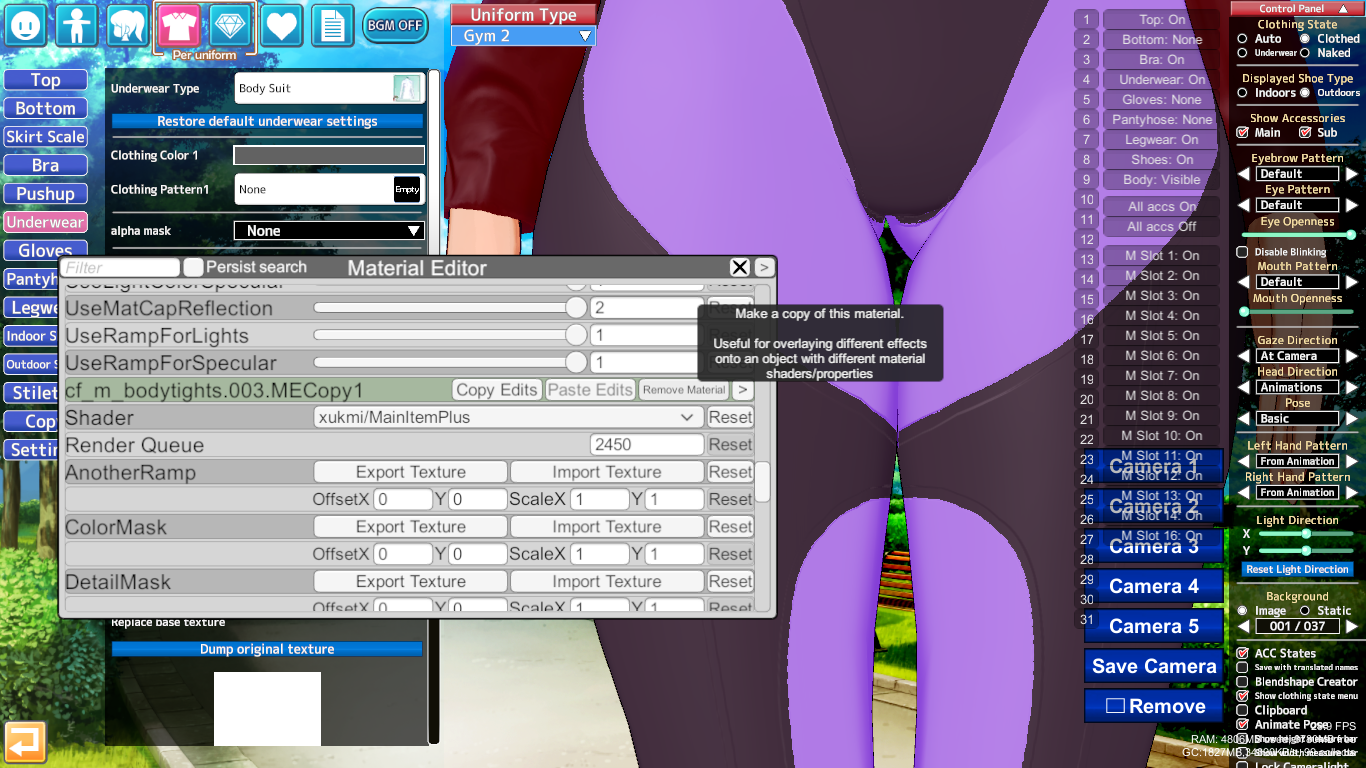
Also I started to check some of the options and I noticed you also have "rules", I think one of those rules should be related to Alphamasks. I was checking my personal OCs and I noticed a very drastic change in a specific clothing.
As you can see here, the borders of the ME.copy to make that style of legging became WAY more noticeable, After checking what was the main reason for it, it turned out to be the Alphamask change, maybe make an exception for Alphamasks? those textures arent that big either, being just 2 to 3 different colors.
 
T

Trace7911

Member
Joined
Aug 28, 2024
Messages
7
Reaction score
27
Points
13
Credits
475
I had to close the process directly, it kept going for 1 hour after saying it finished, I even told it to cancel and that did not stopped.
I do think you should maybe make the program generate a output log to let people share issues.

I just made some changes for a new release. One of the bugs fixed was that I hadn’t anticipated the sheer volume of data being processed, which caused some app communication to break.

Also I started to check some of the options and I noticed you also have "rules", I think one of those rules should be related to Alphamasks. I was checking my personal OCs and I noticed a very drastic change in a specific clothing.
As you can see here, the borders of the ME.copy to make that style of legging became WAY more noticeable, After checking what was the main reason for it, it turned out to be the Alphamask change, maybe make an exception for Alphamasks? those textures arent that big either, being just 2 to 3 different colors.
The rules editor can technically do a lot, but I mentioned earlier that I don’t know what a good general set of defaults would be, unfortunately. Is the material name of all alpha masks ME.copy?
 
J

Jaacker

Well-known Member
Joined
Apr 21, 2025
Messages
47
Reaction score
104
Points
33
Credits
1,490
Is the material name of all alpha masks ME.copy?
No, its a function that allows you to copy a material to overlap different effects, if a thing in the outfit has a copied material, it will be called "MECopy#" at the end, # being the number of material copies from that specific material.
Aside from that, if you want real testing, you should probably go ask in the big community discord, here you probably won't be able to get feedback because everyone is focused on the card sharing thread or are only interested in hoarding cards from specific creators.
 
N

noideasforanusername

Well-known Member
Joined
Mar 22, 2025
Messages
58
Reaction score
111
Points
33
Credits
1,855
so, ig there has to be a toggle for make the tool skipping alphamasks, as i got some issues regarding those.
r31lgr.png

qfmv19.png
 
J

Jaacker

Well-known Member
Joined
Apr 21, 2025
Messages
47
Reaction score
104
Points
33
Credits
1,490
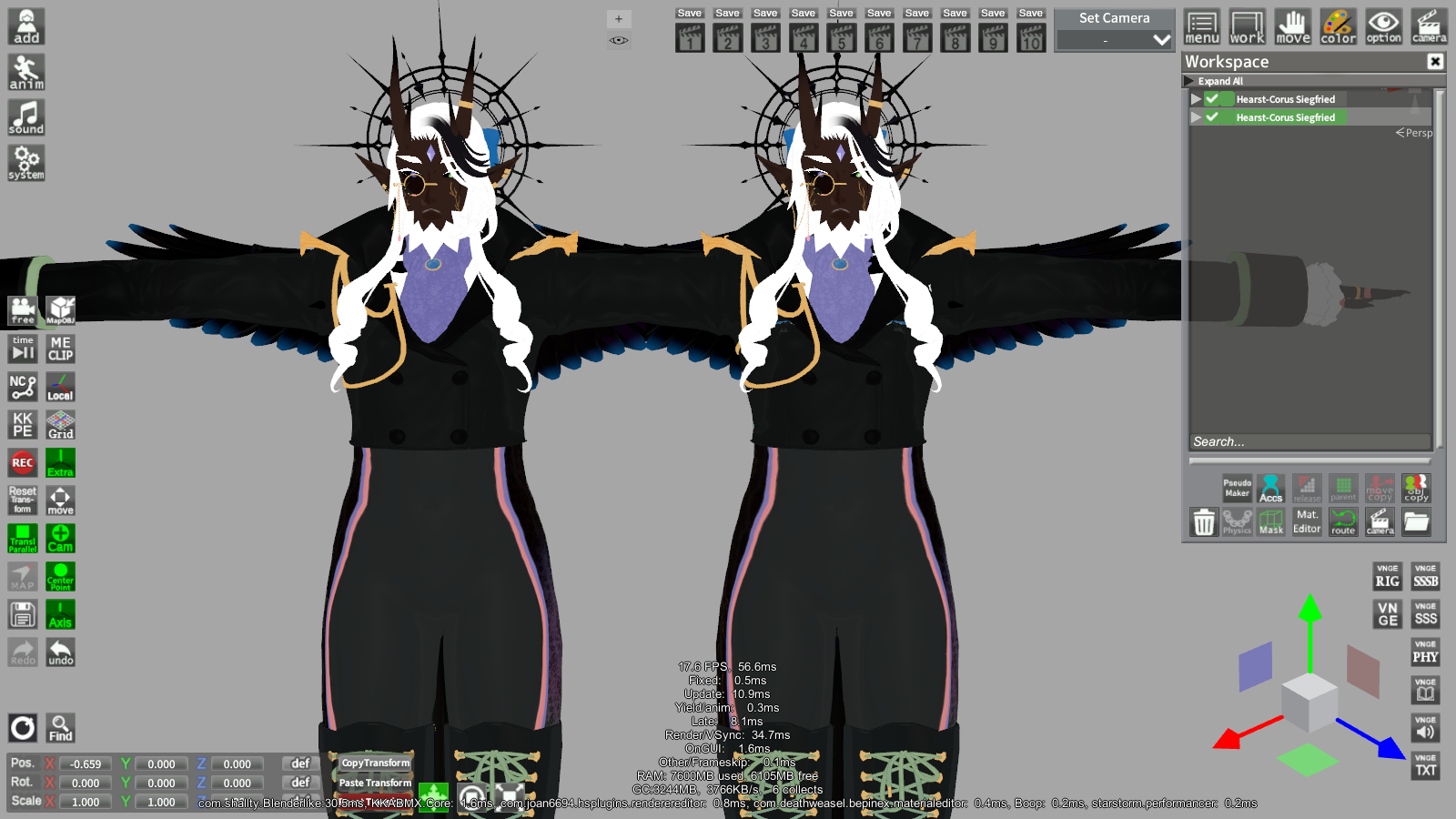
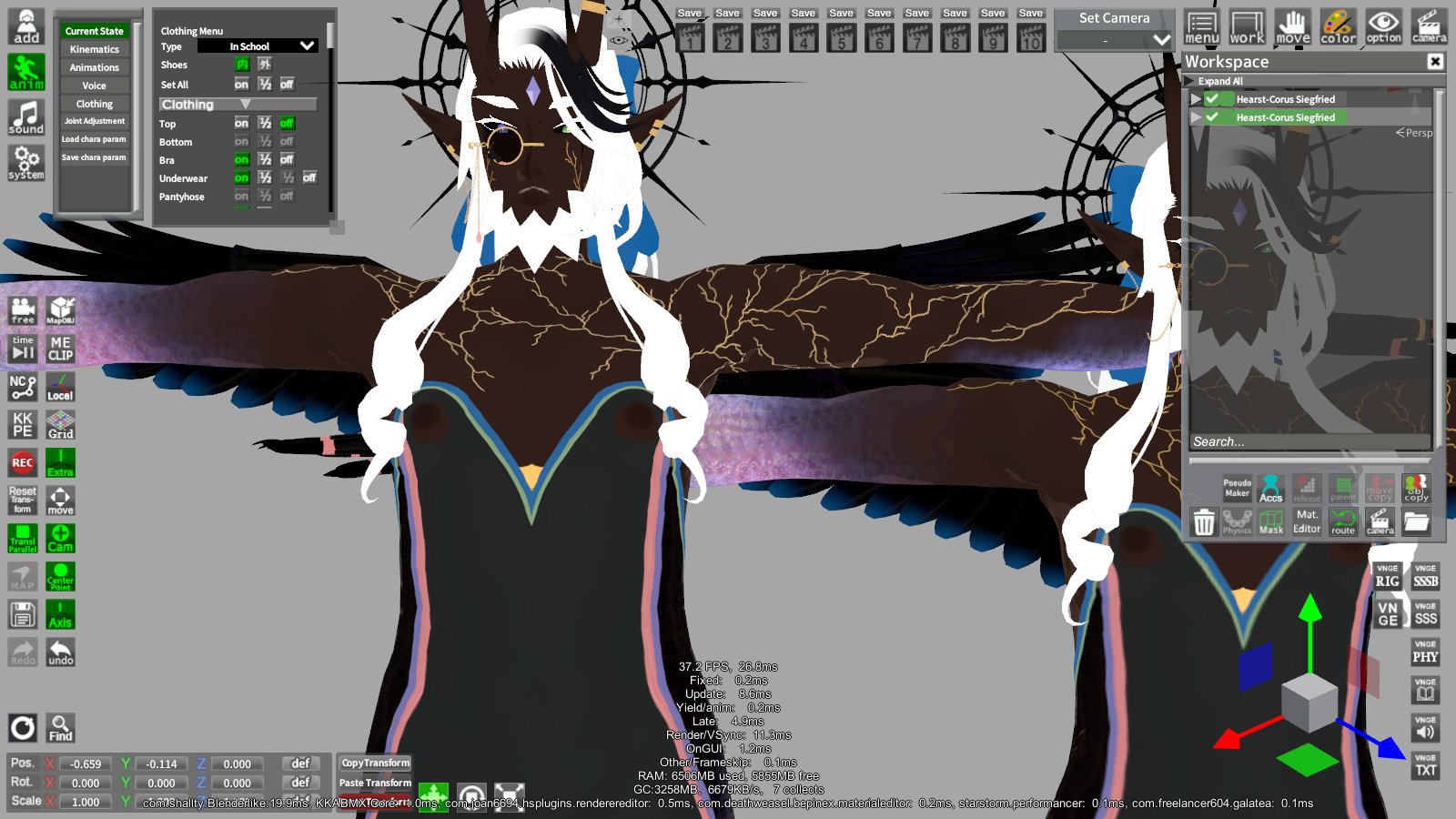
I just went to check in the heaviest cards I had at hand converted. Then I grabbed the original cards in my storage, And I started to check one by one if they changed stuff.
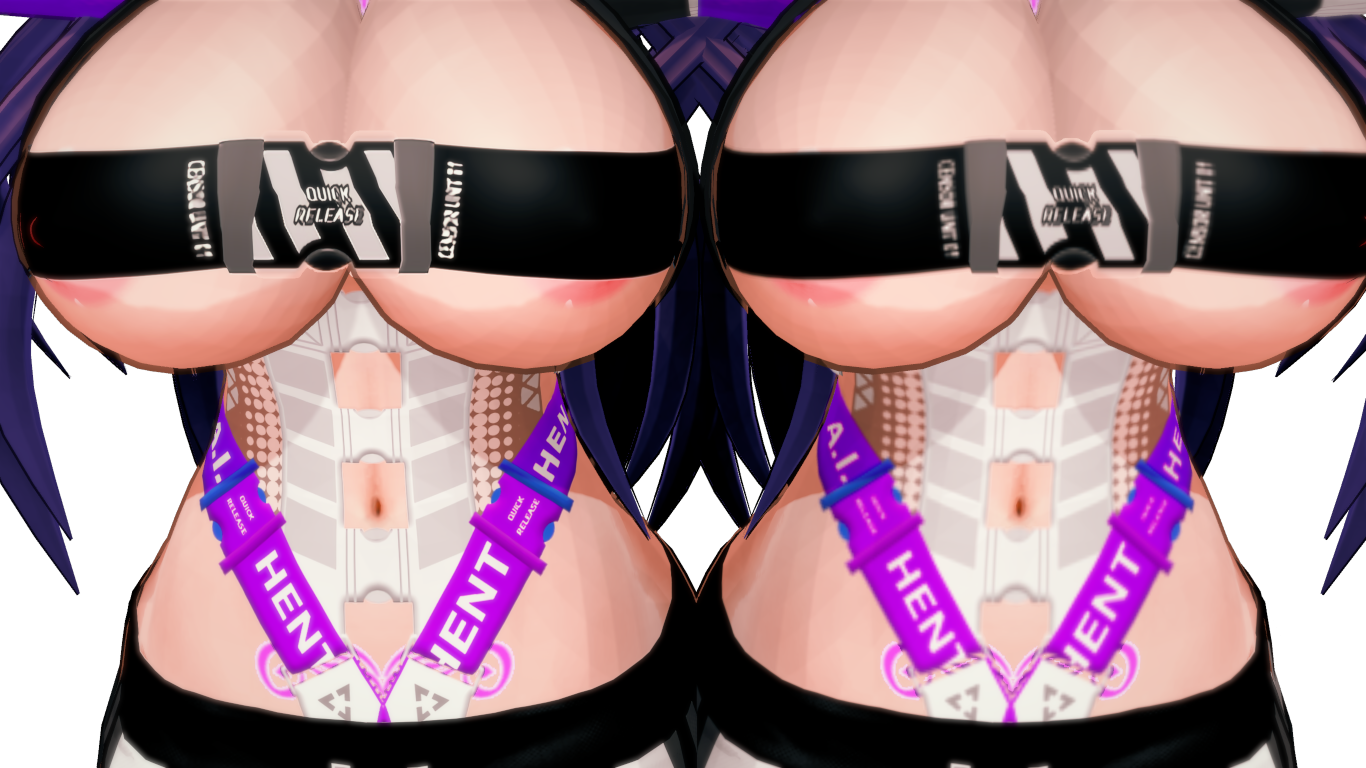
Left is the converted one, I don't know why it had those nipples in there, but I'm pointing them out just in case.
I don't know what is happening here, because the error seems to only sometimes happen, I don't know why the hair got changed in this card.
This one is just showing how the size conversion makes the outfit look if it had slots of tiny details, It's not really something you can stop when you are resizing them from 4k to 1k, but I'm posting it mostly to show an example of how the "quality loss" goes through in a card.
 
Anni93

Anni93

Veteran Member
Joined
Sep 1, 2024
Messages
178
Reaction score
387
Points
63
Credits
4,485
I just went to check in the heaviest cards I had at hand converted. Then I grabbed the original cards in my storage, And I started to check one by one if they changed stuff.
Left is the converted one, I don't know why it had those nipples in there, but I'm pointing them out just in case.
I don't know what is happening here, because the error seems to only sometimes happen, I don't know why the hair got changed in this card.
This one is just showing how the size conversion makes the outfit look if it had slots of tiny details, It's not really something you can stop when you are resizing them from 4k to 1k, but I'm posting it mostly to show an example of how the "quality loss" goes through in a card.
And that's exactly what I was talking about: assets and their dimensions are relative; sizes are highly flexible and can differ from asset to asset.
Therefore, reducing everything to the same size isn't a good idea.
I haven't used this program yet. I don't know what the thresholds might be in the assets listed on your character sheet. So, I'm not sure what the difference is between manually changing the file and using the program. So, I can't rule out that the program itself could cause problems.
I know one thing: adjusting every asset to 1k is a terrible idea.
First, you might miss the thresholds, and second, in the worst case, you might worsen the optimization if the change turns out to result in more pixels than before.
Unless the program only interferes with the largest ones, but if it also affects the smaller ones, it would be bad.
firstly, it is an increase in pixels, and secondly, increasing from a smaller texture to a larger one will simply worsen the details because they will be artificially stretched.
therefore, it is reduced from a larger to a smaller size when creating a backup copy of the file or undoing edits in a graphics program.
because it is easier to return if it turns out that the asset requires different dimensions.
And that's the difference: no one can control an automated program with so many relative constraints. A human can control themselves, see in practice what might be out of place, undo changes, and look for other parameters in a graphics program based on their own mistakes.

Yeah some screenshots also show strange things starting to happen, like the nipples, which is clearly concerning.
I don't even know what could have happened there, but it has nothing to do with changing the size of the canvas, and this is already disturbing, because some strange interference appears, off-topic.

Anyway
I don't know if it's really possible to create such a program that wouldn't make mistakes, I guess not, people even tried to create tools to port headmods from koikatsu to Emotion Creators, because the structures are different, and they also failed at this task. Even card converters are not infallible.
I'll probably stick with manual.
I don't know much about coding, but I imagine someone would have to implement some kind of script. A human would first manually process all possible assets, then create a line of code that would know the ideal parameters to change and automatically adjust accordingly. This would also require updating the program with each new asset in the future. Otherwise, I can't imagine the program knowing the ideal proportions for xxx assets in the database on its own.

I know one thing for sure, we have a lot of talented people in the illusion games community, and the author of this treat herself has impressed me a lot with what she has already done, I wish her luck and success.

 
Last edited:
J

Jaacker

Well-known Member
Joined
Apr 21, 2025
Messages
47
Reaction score
104
Points
33
Credits
1,490
No, its a function that allows you to copy a material to overlap different effects, if a thing in the outfit has a copied material, it will be called "MECopy#" at the end, # being the number of material copies from that specific material.
Aside from that, if you want real testing, you should probably go ask in the big community discord, here you probably won't be able to get feedback because everyone is focused on the card sharing thread or are only interested in hoarding cards from specific creators.
I was talking about this plugin in the Main Koikatsu discord and someone pointed out that this can probably be fixed by using some aliasing and doing some Edge detection, then shared this code:

public TextureElement EdgeDetection()
{
return AddOperation(tex =>
{
int width = tex.width;
int height = tex.height;
Color[] pixels = tex.GetPixels();
Color[] newPixels = new Color[pixels.Length];

for (int x = 1; x < width - 1; x++)
{
for (int y = 1; y < height - 1; y++)
{
int index = y * width + x;
float gx = pixels[index - 1].grayscale - pixels[index + 1].grayscale;
float gy = pixels[index - width].grayscale - pixels[index + width].grayscale;
float magnitude = Mathf.Sqrt(gx * gx + gy * gy);
newPixels[index] = new Color(magnitude, magnitude, magnitude, pixels[index].a);
}
}

tex.SetPixels(newPixels);
});
}

No idea if it will be useful to you but Im sharing it just in case.
 
R

RJ45

New member
Joined
Apr 11, 2026
Messages
1
Reaction score
1
Points
0
Credits
35
Disk space is expensive, and 4k textures are overkill. I wrote a tool to automatically resize large material editor textures. It works with char cards, scenes, and coordinate cards. I thought someone might find it useful, so I’m sharing it. It reduced my PITB folder from 16GB to 9GB, Eve Kaczmarek scenes from 16GB to 10GB, and Grafko clothing from 9GB to 4GB. What the hell, Grafko.

Requires technical knowledge. It’s hosted here: https://gitgoon.dev/Liquid4139/kkPy
Remember to back up your files. It’s worked for me, but I’m not responsible if it corrupts your cards.

Updates:
  • 1.0.0: Added a GUI and a simple run script.
  • 1.0.1: Fixes for texture processing timeouts and processing many files
So im writing it just in case someone has a same problem as i did, i don't know if it intended feature or not but when the scenes are reduced in size in a bulk and the option to replace it after reducing size is ticked ,the scenes from KK become the KKS scenes, so if you get error that a file is corrupted or from different game, try downloading the KKS to KK scene converter to see if it fixes before panicking like i did xd.
Besides that, i want to thank for sharing this tool, it saved me many hours of manual reduction to save disk space
 
T

Trace7911

Member
Joined
Aug 28, 2024
Messages
7
Reaction score
27
Points
13
Credits
475
I just went to check in the heaviest cards I had at hand converted. Then I grabbed the original cards in my storage, And I started to check one by one if they changed stuff.
Left is the converted one, I don't know why it had those nipples in there, but I'm pointing them out just in case.
I don't know what is happening here, because the error seems to only sometimes happen, I don't know why the hair got changed in this card.
This one is just showing how the size conversion makes the outfit look if it had slots of tiny details, It's not really something you can stop when you are resizing them from 4k to 1k, but I'm posting it mostly to show an example of how the "quality loss" goes through in a card.
The nipples issue is strange. I have a test to ensure only texture data is modified. Regarding the hair change, there’s likely a line map, and the size change might not be working well with it.
And that's exactly what I was talking about: assets and their dimensions are relative; sizes are highly flexible and can differ from asset to asset.
Therefore, reducing everything to the same size isn't a good idea.
I haven't used this program yet. I don't know what the thresholds might be in the assets listed on your character sheet. So, I'm not sure what the difference is between manually changing the file and using the program. So, I can't rule out that the program itself could cause problems.
I know one thing: adjusting every asset to 1k is a terrible idea.
First, you might miss the thresholds, and second, in the worst case, you might worsen the optimization if the change turns out to result in more pixels than before.
Unless the program only interferes with the largest ones, but if it also affects the smaller ones, it would be bad.
firstly, it is an increase in pixels, and secondly, increasing from a smaller texture to a larger one will simply worsen the details because they will be artificially stretched.
therefore, it is reduced from a larger to a smaller size when creating a backup copy of the file or undoing edits in a graphics program.
because it is easier to return if it turns out that the asset requires different dimensions.
And that's the difference: no one can control an automated program with so many relative constraints. A human can control themselves, see in practice what might be out of place, undo changes, and look for other parameters in a graphics program based on their own mistakes.

Yeah some screenshots also show strange things starting to happen, like the nipples, which is clearly concerning.
I don't even know what could have happened there, but it has nothing to do with changing the size of the canvas, and this is already disturbing, because some strange interference appears, off-topic.

Anyway
I don't know if it's really possible to create such a program that wouldn't make mistakes, I guess not, people even tried to create tools to port headmods from koikatsu to Emotion Creators, because the structures are different, and they also failed at this task. Even card converters are not infallible.
I'll probably stick with manual.
I don't know much about coding, but I imagine someone would have to implement some kind of script. A human would first manually process all possible assets, then create a line of code that would know the ideal parameters to change and automatically adjust accordingly. This would also require updating the program with each new asset in the future. Otherwise, I can't imagine the program knowing the ideal proportions for xxx assets in the database on its own.

I know one thing for sure, we have a lot of talented people in the illusion games community, and the author of this treat herself has impressed me a lot with what she has already done, I wish her luck and success.
The app doesn’t resize textures smaller than the threshold or replace them if resizing makes them larger. Dynamic texture sizing is the intent of rules configuration. I can probably create conservative rules that save space, but I wish I had more time to find patterns or work on this.

So im writing it just in case someone has a same problem as i did, i don't know if it intended feature or not but when the scenes are reduced in size in a bulk and the option to replace it after reducing size is ticked ,the scenes from KK become the KKS scenes, so if you get error that a file is corrupted or from different game, try downloading the KKS to KK scene converter to see if it fixes before panicking like i did xd.
Besides that, i want to thank for sharing this tool, it saved me many hours of manual reduction to save disk space
That was interesting. I didn’t notice this because my modded game loads both KK and KKS scenes. Apparently, the scene loading library automatically converts to KKS. I fixed it in the latest version, so it should be fine now.
 

Similar threads

trpotat22
Replies
38
Views
14K
trpotat22
trpotat22
Top
これは閲覧専用の自動翻訳ページです。返信・検索・ログインなどの操作は、オリジナルの英語版サイトへ移動してください。 英語版で開く (Open in English) ×