

You are using an out of date browser. It may not display this or other websites correctly.
You should upgrade or use an alternative browser.
You should upgrade or use an alternative browser.
A
anima
Veteran Member

[R-18]釘崎❤️薔薇
(330P) ju!utsu V2 Classmate With You https://app.unifans.io/posts/61fdc87b2ba093ad725d183dcc9ac361 https://www.fansky.co/mrkklab/123 (3
 www.pixiv.net
 They're not on kemono or hitomi.
P
poiuha
New member

Anyone have this ? pls help
F
Flemiran
Active Member
Anyone know how to make so the left & right iris/hitomi position the same when trying to edit a card with different eye overlay?

LordBubnub
KK Master
Could you show a screenshot of what you're doing and what you're trying to achieve? It helps when you visualize it.Anyone know how to make so the left & right iris/hitomi position the same when trying to edit a card with different eye overlay?
LordBubnub
KK Master
Try asking the mod thread
Anyone have this ? pls help
Mod - [ILLUSION] Koikatu! - Mod Search and Sharing Thread
[ILLUSION] Koikatu! - Mod Search and Sharing Thread

Darkss12
New member
Hi, I'm practically new to chara.studio, having started a couple of months ago.
I have the rx22 version of Koikatsu Party and I'm having a problem loading scenes, as most of them, when I load them, the characters appear all jumbled up or practically broken, especially if the scene uses timeline or nodesconstrain.
I recently realized it might be a nodesconstrain bug, but I don't know how to fix it quickly. I don't usually get any warnings about missing mods; the characters just appear broken. I've tried setting the T-pose and toggling FK and IK to the characters, but nothing works. This has been happening since I started, but I used to just keep loading scenes until one wasn't broken, but it's quite annoying that it happens with most of them.
If anyone can lend a hand, I'd really appreciate it. Thank you!
I have the rx22 version of Koikatsu Party and I'm having a problem loading scenes, as most of them, when I load them, the characters appear all jumbled up or practically broken, especially if the scene uses timeline or nodesconstrain.
I recently realized it might be a nodesconstrain bug, but I don't know how to fix it quickly. I don't usually get any warnings about missing mods; the characters just appear broken. I've tried setting the T-pose and toggling FK and IK to the characters, but nothing works. This has been happening since I started, but I used to just keep loading scenes until one wasn't broken, but it's quite annoying that it happens with most of them.
If anyone can lend a hand, I'd really appreciate it. Thank you!
F
Flemiran
Active Member
Before AfterCould you show a screenshot of what you're doing and what you're trying to achieve? It helps when you visualize it.


LordBubnub
KK Master
Ahh that's because your iris isn't the same image size as the first. It looks like the heart irises are smaller. The best solution I can provide to you is to use a photo editor and try to match the size of the original so you don't have to mess with the sliders. If you don't have a photo editor, I can edit the size for you. Send over the card and the irises. Should be simple enough to match itBefore After
F
Flemiran
Active Member
HereAhh that's because your iris isn't the same image size as the first. It looks like the heart irises are smaller. The best solution I can provide to you is to use a photo editor and try to match the size of the original so you don't have to mess with the sliders. If you don't have a photo editor, I can edit the size for you. Send over the card and the irises. Should be simple enough to match it

Clauzmak
New member
Hey,
I'm getting back into Koikatsu after a long break. And for this restart, I decided to reinstall the entire game and start from scratch. (It's not like the 1.5 terabytes of my old Koikatsu folder were starting to get heavy.)
All that just to find it full of cards I wasn't using or crappy scenes. So I deleted EVERYTHING and reinstalled it all, and I feel like I'm rediscovering some aspects of the studio. (I went from version 12 to version 22)
Anyway, now that you have the context, I have a problem I didn't have before. When I load some cards I had backed up, the characters' skin turns "white" like snow.
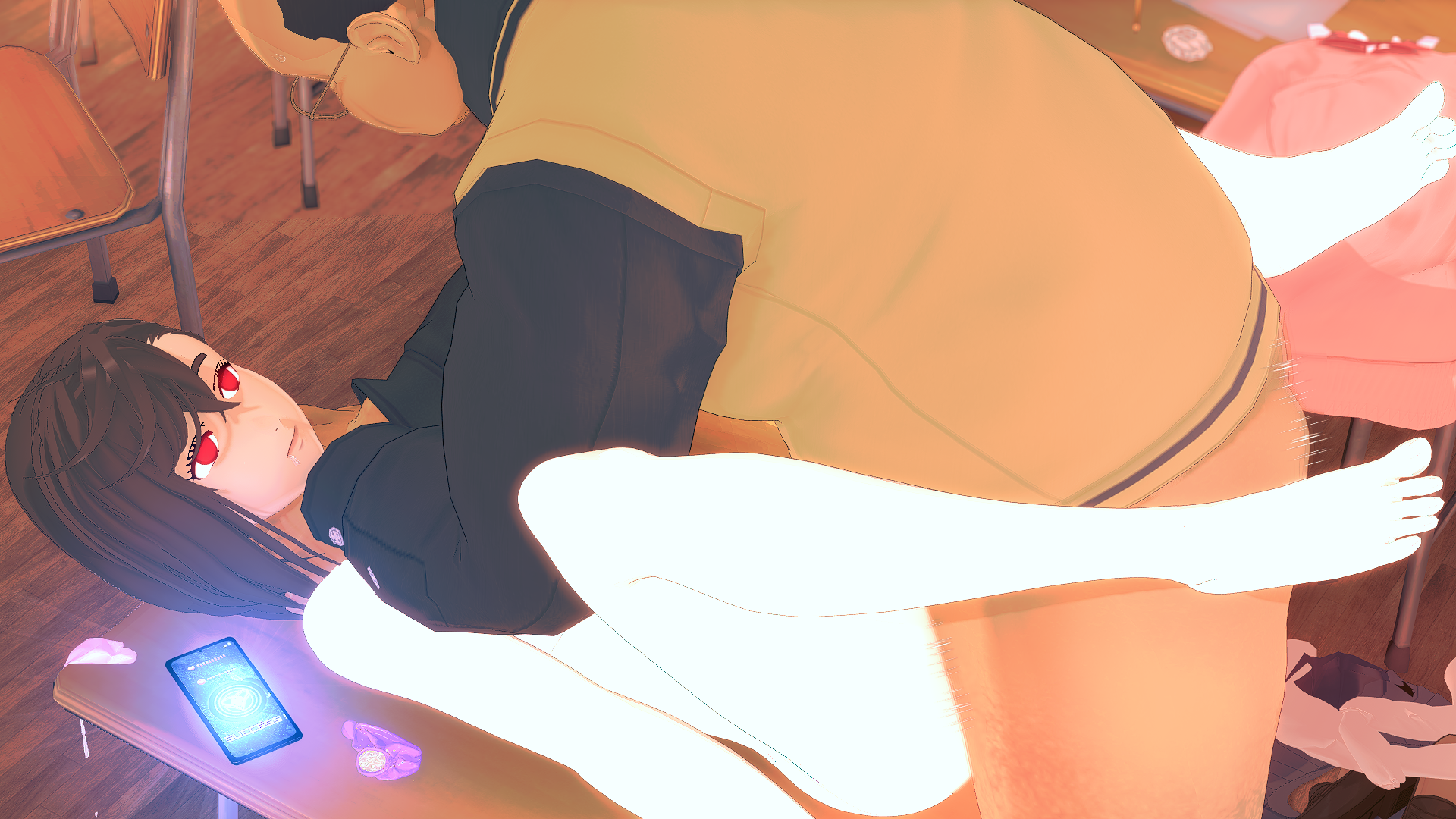
The same thing happens with some scenes I downloaded where the character appears snow-white. At first, I thought it was the shaders, but no. So I must be missing a skin mod, but I no longer have my old game file, and when I load it, it doesn't tell me I'm missing anything.
Any ideas?
I'm getting back into Koikatsu after a long break. And for this restart, I decided to reinstall the entire game and start from scratch. (It's not like the 1.5 terabytes of my old Koikatsu folder were starting to get heavy.)
All that just to find it full of cards I wasn't using or crappy scenes. So I deleted EVERYTHING and reinstalled it all, and I feel like I'm rediscovering some aspects of the studio. (I went from version 12 to version 22)
Anyway, now that you have the context, I have a problem I didn't have before. When I load some cards I had backed up, the characters' skin turns "white" like snow.
The same thing happens with some scenes I downloaded where the character appears snow-white. At first, I thought it was the shaders, but no. So I must be missing a skin mod, but I no longer have my old game file, and when I load it, it doesn't tell me I'm missing anything.
Any ideas?
LordBubnub
KK Master
Before After


Yep, just needed to resize it. Here you go
Loading…
gofile.io
On a sidenote, there's also this website which is like a browser based photoshop. It's pretty good for simple edits like these
Photopea | Online Photo Editor
Photopea Online Photo Editor lets you edit photos, apply effects, filters, add text, crop or resize pictures. Do Online Photo Editing in your browser for free!
 www.photopea.com
Last edited:
F
Flemiran
Active Member
First off, thanks for the editYep, just needed to resize it. Here you go
On a sidenote, there's also this website which is like a browser based photoshop. It's pretty good for simple edits like these
Second, I have been using that for editing but, for hitomi/eyes, some cards have different left and right, so when you use different one (like same texture for both eyes) even when the size is the same, the result make the have derpy face. Tried it with adv bone editor and it still same
LordBubnub
KK Master
I guess the original left and right eyes are not completely round. Maybe this is better where the left and right eyes are the same shape as the original. Just change the left and right irises via chara maker.First off, thanks for the edit
Second, I have been using that for editing but, for hitomi/eyes, some cards have different left and right, so when you use different one (like same texture for both eyes) even when the size is the same, the result make the have derpy face. Tried it with adv bone editor and it still same


Left and Right heart eyes. I also included the two layers in case you want to move the heart around
Loading…
gofile.io
F
Flemiran
Active Member
Thanks, also kinda sad that it can't be replicated if you want to do it in studio, unless there are plugins for thatI guess the original left and right eyes are not completely round. Maybe this is better where the left and right eyes are the same shape as the original. Just change the left and right irises via chara maker.
Left and Right heart eyes. I also included the two layers in case you want to move the heart around
LordBubnub
KK Master
Yes you can, with Studio Pseudo Maker. It basically puts a mini maker in studio, you can edit the each iris from there. Pretty handy for one the spot edits.Thanks, also kinda sad that it can't be replicated if you want to do it in studio, unless there are plugins for that


Here's the plugin
Loading…
gofile.io
W
WaterFlow
New member
I recently moved from afterparty into sunshine and when i went into studio it looked like this
any idea how to fix this?
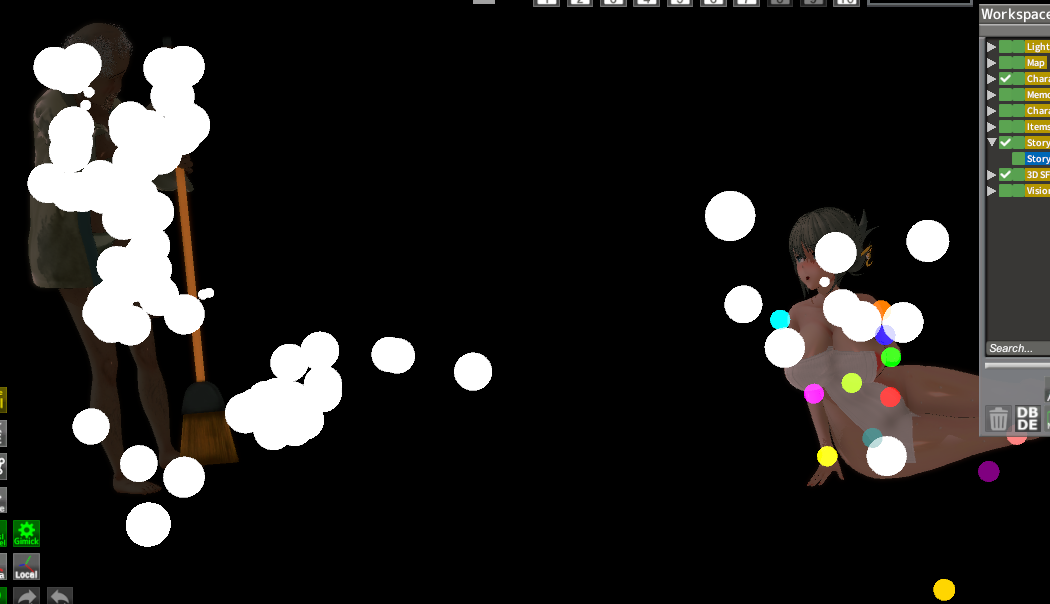
any idea how to fix this?

The5thWorstGamerEver
Member
I'm back again with a new problem. So with the latest version of the HF Patch (3.38), I'm running into a weird issue with certain character cards. I noticed these are headmod cards so I suspect it's the headmod that's causing the issue except not every card I have that has a headmod has this problem.
So as an example, here's a Mugenalien scene with a non-headmod character by Frecklerae:

Now here's the same scene with nearly the same timestamp:

Notice how the monitor for Mei has the counter stuck at 0 and the color is still blue. It's supposed to be red and the number is supposed to increase as the scene progresses yet it does not with Mei. It isn't just this scene but this is probably the easiest to show the issue. For every scene, the Mei card either breaks the scene OR the facial expression stays static and never animates. As I mentioned before this only happens with certain characters with headmods. I'm pretty sure most if not all my Frecklerae cards with headmods suffer from this issue and I noticed a few of Evaans cards also had the same issue but not all of them.
Any ideas as to what is happening and/or if there's a way to fix this?
Here are the character cards and scene I used in case it helps: here
So as an example, here's a Mugenalien scene with a non-headmod character by Frecklerae:
Now here's the same scene with nearly the same timestamp:
Notice how the monitor for Mei has the counter stuck at 0 and the color is still blue. It's supposed to be red and the number is supposed to increase as the scene progresses yet it does not with Mei. It isn't just this scene but this is probably the easiest to show the issue. For every scene, the Mei card either breaks the scene OR the facial expression stays static and never animates. As I mentioned before this only happens with certain characters with headmods. I'm pretty sure most if not all my Frecklerae cards with headmods suffer from this issue and I noticed a few of Evaans cards also had the same issue but not all of them.
Any ideas as to what is happening and/or if there's a way to fix this?
Here are the character cards and scene I used in case it helps: here
I
I LIKE TURTLES
New member
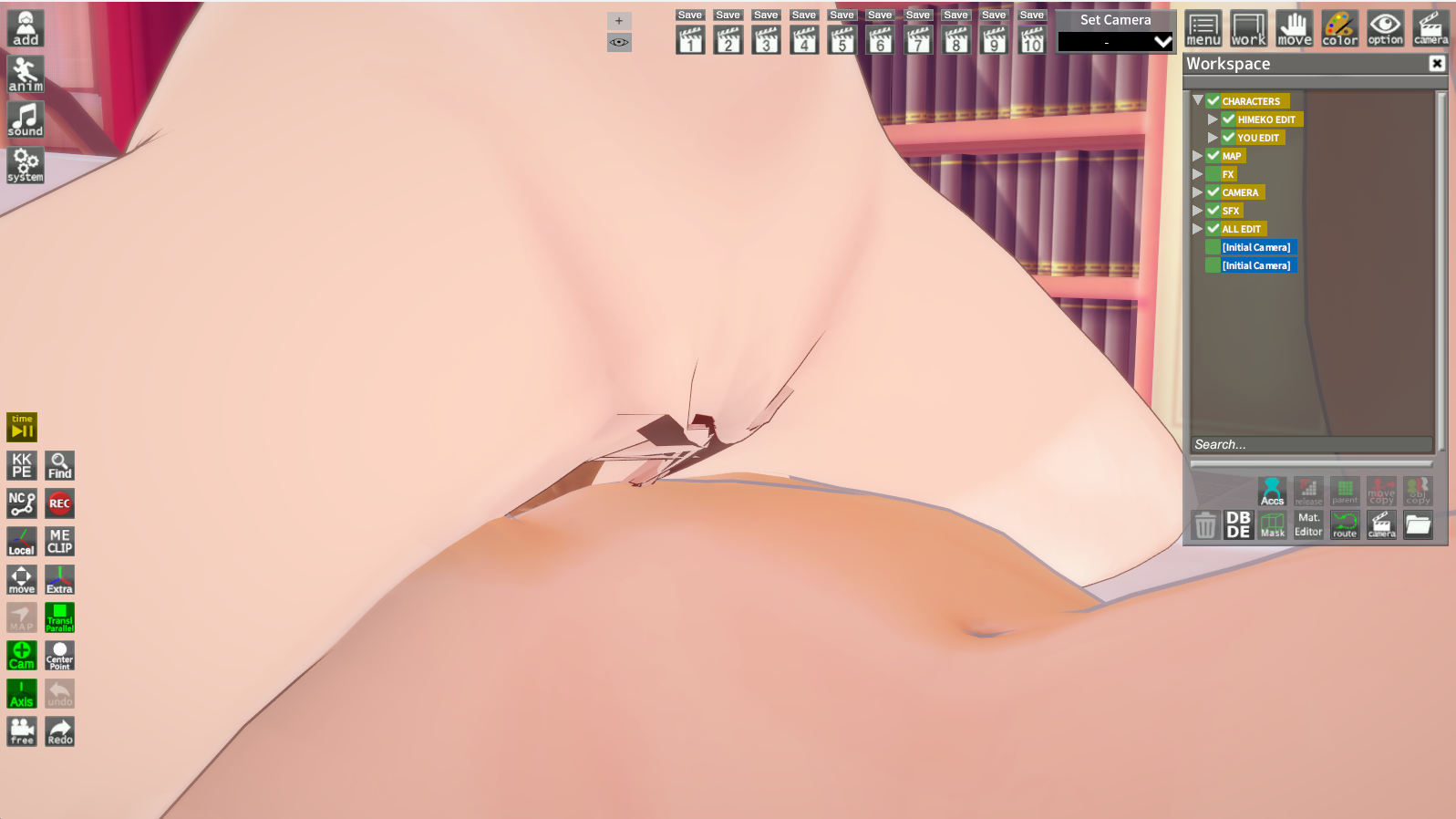
Anyone know how to fix this distorted looking genitalia. It's from mastapov's scene and honestly, when I load most of their scenes(the chika ver) the genitalia is always the one looking distorted i.e. black cracks and etc
Edit: Nvm, I found out the cause and solution by learning studio stuff just now lmao, turns out it's the colliders. ✌️
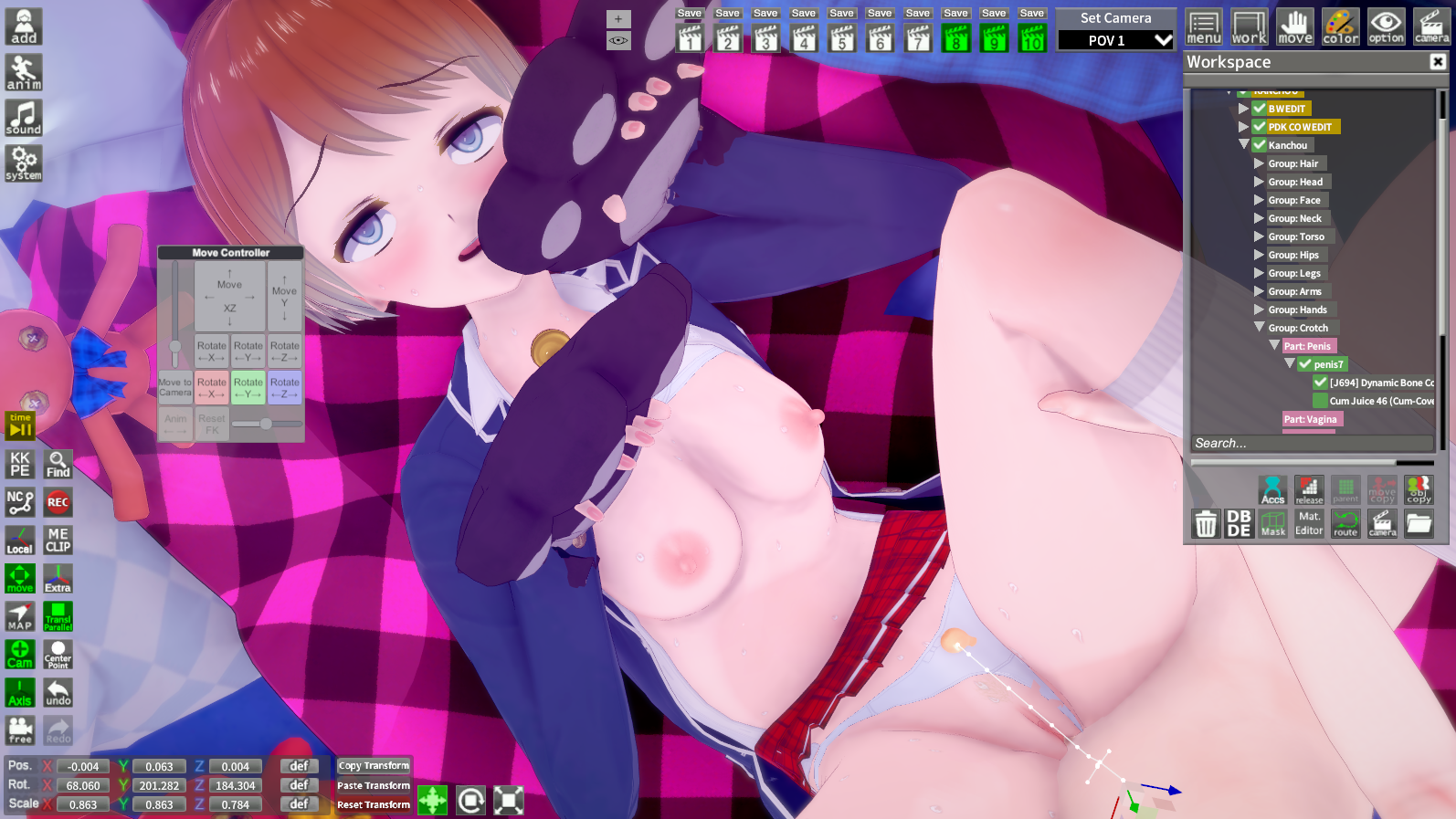
OK, new question. Does anyone know how to make the penis not clip out the stomach. I think it's dynamic bone and idk how to do this stuff..
another question, there are some of mastapov's scenes where the penis doesn't even go into the vagina then just clips and/or jerks back and forth, notably their fern scene(https://kk.now.cc/threads/help-with-male-insertion.2131/). Has anyone found any prominent solutions?
The more you know, the more you realize you don't know. 😔
Last edited:
G
gga
New member
Help! I'm a CharaStudio newbie and I don't know why there's a super holy light effect in every scene I enter (even after removing all mods, the holy light still appears in CharaStudio).


R
RE:Infinity
New member
Have you guys ever encountered a virus in any of the files being shared? any coordinates, cards, scenes etc? Also how do you check for them if you do?
LordBubnub
KK Master
Have you guys ever encountered a virus in any of the files being shared? any coordinates, cards, scenes etc? Also how do you check for them if you do?

This 🔼🔼🔼
One of the best ways to check a single file or URL in case it is malicious. I use it all the time for all sorts of pirating needs or websites. If it's a zip file, the max file size is 650 MB. However, you should still take the necessary precautions and always be careful. And the classic, "use Firefox with uBlock Origin" phrase is not just a phrase for no reason.
Do keep in mind on the false positives, just keep in mind that stuff being shared here are "typically" safe, but it never hurts to be too careful.
R
RE:Infinity
New member
that's what I am using thanks, just wanted to make sure if there's anything else to keep in mind, I searched about png filesbeing very rar files to put viruses on but I thought that the cards, coordinates and scenes aren't just png they contain stuff inside and that's why I was sceptical
This 🔼🔼🔼
One of the best ways to check a single file or URL in case it is malicious. I use it all the time for all sorts of pirating needs or websites. If it's a zip file, the max file size is 650 MB. However, you should still take the necessary precautions and always be skeptical. And the classic, "use Firefox with uBlock Origin" phrase is not just a phrase for no reason.
Do keep in mind on the false positives, just keep in mind that stuff being shared here are "typically" safe, but it never hurts to be careful.
LordBubnub
KK Master
It also helps if the user sharing has posting history. The good thing about having an account is that you can look up a user's profile to see if they have a history of sharing and/or if the reception of what they are sharing is positive. If you really really really are that skeptical, then just wait a few hours or a day after someone posted something. If there are no negative responses, then yeah, it's should be safe 👍 and if it's not, for sure someone would have made a post about an issue.that's what I am using thanks, just wanted to make sure if there's anything else to keep in mind, I searched about png filesbeing very rar files to put viruses on but I thought that the cards, coordinates and scenes aren't just png they contain stuff inside and that's why I was sceptical

gustavo40
KK Master
Have you checked if the character lightning strength is too high? Or if the PostProcessingEffect plugin were enabled? If you're using the Xukmi Vanilla Plus shaders, you can reduce the brightness of the point light using Materialeditor/MassShader Editor.Help! I'm a CharaStudio newbie and I don't know why there's a super holy light effect in every scene I enter (even after removing all mods, the holy light still appears in CharaStudio).
video
M
MorumoMerry
Veteran Member
I was using Gofile, but I can't upload anything anymore.
I think I've hit my storage limit.
Does this reset after a month?
I think I've hit my storage limit.
Does this reset after a month?
M
mudaaa1
New member
この歪んだ性器を修正する方法を知っている人はいますか?これはマスタポフのシーンからのもので、正直なところ、彼らのシーン(チカバージョン)のほとんどを読み込むと、性器が常に歪んで見えます。つまり、黒いひび割れなどです。
追記:いや、今スタジオのことを勉強して原因と解決策がわかったよ(笑)。どうやらコライダーが原因だったみたい。✌️
さて、新しい質問です。ペニスが腹部から飛び出さないようにする方法を知っている人はいますか?ダイナミックボーンだと思うのですが、やり方がよくわからないんです。
もう一つ質問なのですが、マスタポフの作品の中には、ペニスが膣に入らず、ただクリップしたり、前後に揺らしたりするだけのシーンがいくつかあります。特に、シダのシーン(https://kk.now.cc/threads/help-with-male-insertion.2131/)がそうです。何か効果的な解決策を見つけた方はいらっしゃいますか?
知れば知るほど、自分が知らないことがたくさんあることに気づく。😔
Sometimes, changing the position, direction, or length of the penis, or adjusting the size of the character, can help.
G
gga
New member
Thank you! I successfully turned it off. You're my hero!Have you checked if the character lightning strength is too high? Or if the PostProcessingEffect plugin were enabled? If you're using the Xukmi Vanilla Plus shaders, you can reduce the brightness of the point light using Materialeditor/MassShader Editor.
video
I
ilossi9
New member
Hello everyone, I'm experiencing a strange issue with Koikatsu Sunshine main game H-scene and I'm hoping someone can help.
CLARIFICATIONS :
I am using Koikatsu Sunshine BetterRepack with KPlug (August 2025 release, version 3.48) installed. KPlug was installed correctly and has been working without problems for quite some time. Free H scene loaded normally, custom KPlug animations were available, and all KPlug features appeared to function as intended.
The problem started recently and appeared completely out of nowhere. When I enter the main game and start a Free H scene, I can select the female character, male character, and map without any issue. However, after pressing Start, the game enters the loading screen and never finishes loading.
What confuses me is that I experienced a very similar issue in the past when KPlug was initially installed incorrectly. However, after reinstalling KPlug properly, everything worked perfectly for a long period of time. Because of this, I don't believe the current issue is related to an incorrect KPlug installation.
Any suggestions would be greatly appreciated. Thank you in advance.
CLARIFICATIONS :
I am using Koikatsu Sunshine BetterRepack with KPlug (August 2025 release, version 3.48) installed. KPlug was installed correctly and has been working without problems for quite some time. Free H scene loaded normally, custom KPlug animations were available, and all KPlug features appeared to function as intended.
The problem started recently and appeared completely out of nowhere. When I enter the main game and start a Free H scene, I can select the female character, male character, and map without any issue. However, after pressing Start, the game enters the loading screen and never finishes loading.
What confuses me is that I experienced a very similar issue in the past when KPlug was initially installed incorrectly. However, after reinstalling KPlug properly, everything worked perfectly for a long period of time. Because of this, I don't believe the current issue is related to an incorrect KPlug installation.
Any suggestions would be greatly appreciated. Thank you in advance.
The5thWorstGamerEver
Member
So I messed around with the plugins since I did not remember this issue before I updated the game and found out it was the updated KKPE plugin that was causing the issue. I'm pretty sure the issue can be fixed via messing around with the colliders and bones but I'm an idiot when it comes to that so I just reverted back to an older version and the issue has gone away. Maybe I'll mess around with it later to see if I can fix the issue.I'm back again with a new problem. So with the latest version of the HF Patch (3.38), I'm running into a weird issue with certain character cards. I noticed these are headmod cards so I suspect it's the headmod that's causing the issue except not every card I have that has a headmod has this problem.
So as an example, here's a Mugenalien scene with a non-headmod character by Frecklerae:
Now here's the same scene with nearly the same timestamp:
Notice how the monitor for Mei has the counter stuck at 0 and the color is still blue. It's supposed to be red and the number is supposed to increase as the scene progresses yet it does not with Mei. It isn't just this scene but this is probably the easiest to show the issue. For every scene, the Mei card either breaks the scene OR the facial expression stays static and never animates. As I mentioned before this only happens with certain characters with headmods. I'm pretty sure most if not all my Frecklerae cards with headmods suffer from this issue and I noticed a few of Evaans cards also had the same issue but not all of them.
Any ideas as to what is happening and/or if there's a way to fix this?
Here are the character cards and scene I used in case it helps: here
W
wrxv135
New member
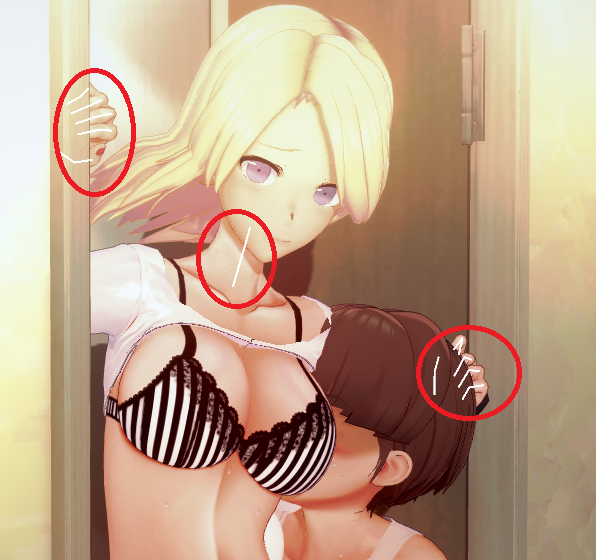
Hello.I want to disable this white FK guide lines.How do I do that?
A
a1020545487
New member


how to fix this bug?it should squeeze like the second pic
G
Gedzi2
New member
anyone know how to fix this?
R
RGM079
Member

Z
zazberik
New member
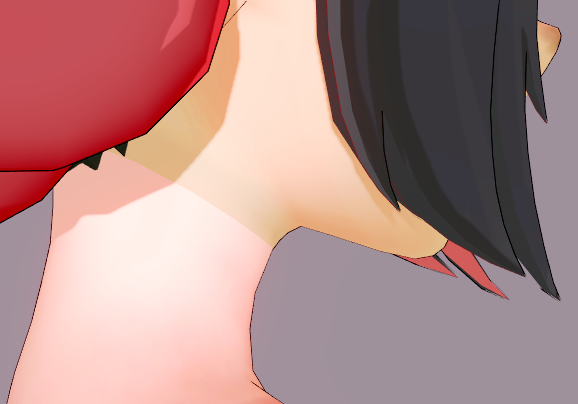
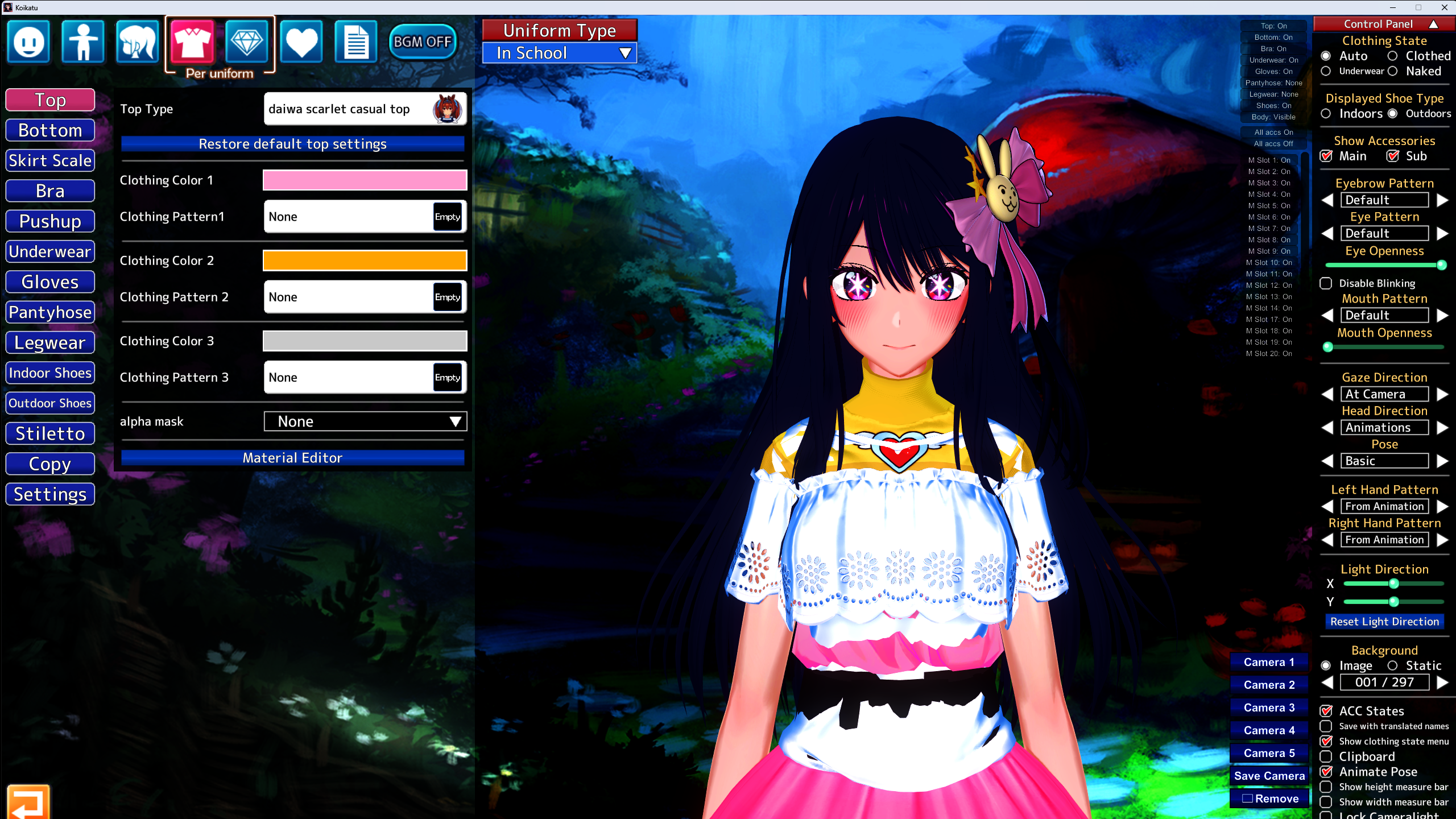
Guys, how to make the head and body the same color?
LordBubnub
KK Master
That's either a shader issue or a maintex issue. Can you check if the shaders for the face and body are the same? If they are, then it's either the skin color settings or it's from the maintex. Then, check if you can adjust the skin color via sliders. If you can, then just match the face and body color code. If can't adjust the skin via sliders, you'll have to edit the maintex using a photo editor.
Guys, how to make the head and body the same color?
Last edited:
Z
zazberik
New member
thank you! I'll try to do somethingThat's either a shader issue or a maintex issue. Can you check if the shaders for the face and body are the same? If they are, then it's either the skin color settings or it's from the maintex. Then, check if you can adjust the skin color via sliders. If you can, then just match the face and body color code. If can't adjust the skin via sliders, you'll have to edit the maintex using a photo editor.

mrbruh
New member
mugenalien update please?


